All you need to know about TLS

Introduction
TLS stands for Transport Layer Security, which is a security protocol designed to allow for secure communication between two parties (machines) over the internet. The term TLS is often used interchangeably with SSL (Secure Sockets Layer) which was used prior to TLS. One of the primary use cases of TLS is to encrypt the communication between a web application & servers over the internet with HTTPS (which denotes HTTP connection implemented over TLS). It can also be used to encrypt other communications such as email, messaging, voice over IP (VoIP).
Following are the main objectives that TLS protocol accomplishes:
- Encryption: Hides data from third parties.
- Authentication: Ensures both parties are who they claim to be using digital certificates.
- Integrity: Verifies that data has not been tampered with or forged during transit.
Use of TLS is essential to enable encrypted communication between client & servers over the internet. Otherwise, the unencrypted data can easily be read by unintended third parties who intercept the data in transit. You definately won't want your users' private information like chats, passwords & even credit card information to be read by any 3rd party. So for any modern day software application that communicates to remote servers over the internet, use of TLS is a must. In the following sections we will explore how TLS works, a hands-on demo to setup TLS on a server, TLS setup with proxy server and mutual TLS, which is an extension of TLS.
How does TLS work?
In any client-server communication that uses TLS, the first step in establising a secure TLS communication channel is the TLS handshake. This handshake is done right after the TCP connection is established with the TCP handshake. The following diagram gives a high level overview of the steps involved in a TLS handshake.
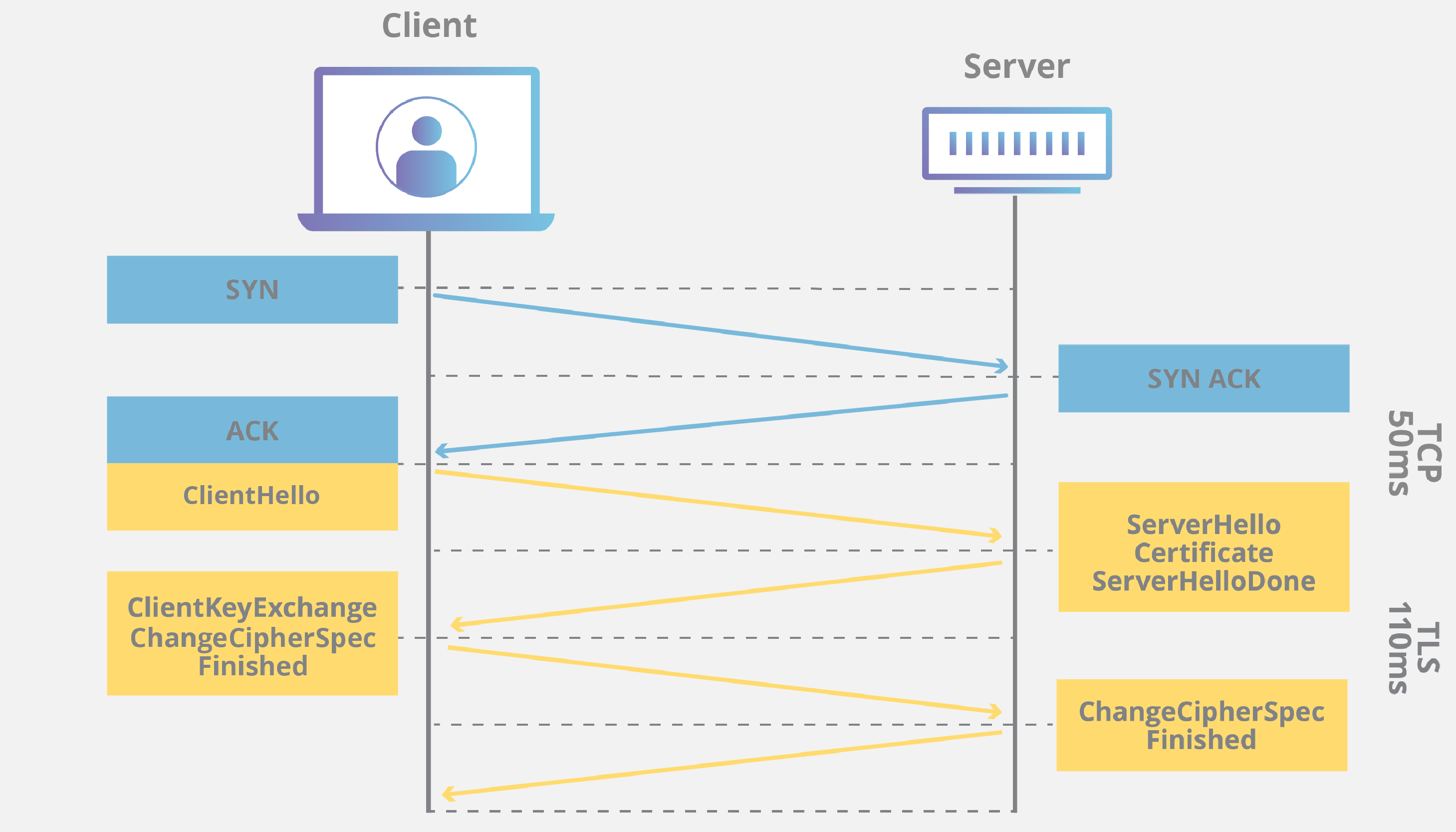
From a bird's eye-view, following are the steps involved in a TLS handshake:
- Client initiates the connection with the server by sharing the protocol version, list of cipher suites & its half of Diffie-Hellman secret.
- Server receives client hello & it then shares it own half of Diffie-Hellman secret.
- Using the half parts of the secrets both the client & server can now compute the symmetric key using which all the data encryption will take place.
- Server then sends its TLS Certificate which is digitally signed by a trusted Certificate Authority (CA).
- The server sends TLS handshake Finished to client after this.
- The client verifies the TLS Certificate with the certificate authority to ensure that the server is truly who it claims to be (Explained further in SSL certificate verification section).
- After the certificate is verified, client sends TLS handshake finished.
You can try running the following curl & openssl commands in your CLI to inspect the steps involved in the TLS handshake:
 % curl -vI https://sundeep-blogs.vercel.app
 * Host sundeep-blogs.vercel.app:443 was resolved.
 * IPv6: (none)
 * IPv4: 216.198.79.131, 64.29.17.131
 *   Trying 216.198.79.131:443...
 * Connected to sundeep-blogs.vercel.app (216.198.79.131) port 443
 * ALPN: curl offers h2,http/1.1
 * (304) (OUT), TLS handshake, Client hello (1):
 *  CAfile: /etc/ssl/cert.pem
 *  CApath: none
 * (304) (IN), TLS handshake, Server hello (2):
 * (304) (IN), TLS handshake, Unknown (8):
 * (304) (IN), TLS handshake, Certificate (11):
 * (304) (IN), TLS handshake, CERT verify (15):
 * (304) (IN), TLS handshake, Finished (20):
 * (304) (OUT), TLS handshake, Finished (20):
 * SSL connection using TLSv1.3 / AEAD-CHACHA20-POLY1305-SHA256 / [blank] / UNDEF
 * ALPN: server accepted h2
 * Server certificate:
 *  subject: CN=*.vercel.app
 *  start date: Feb 26 06:28:03 2026 GMT
 *  expire date: May 27 06:28:02 2026 GMT
 *  subjectAltName: host "sundeep-blogs.vercel.app" matched cert's "*.vercel.app"
 *  issuer: C=US; O=Google Trust Services; CN=WR1
 *  SSL certificate verify ok.
 * using HTTP/2
 * [HTTP/2] [1] OPENED stream for https://sundeep-blogs.vercel.app/
 * [HTTP/2] [1] [:method: HEAD]
 * [HTTP/2] [1] [:scheme: https]
 * [HTTP/2] [1] [:authority: sundeep-blogs.vercel.app]
 * [HTTP/2] [1] [:path: /]
 * [HTTP/2] [1] [user-agent: curl/8.7.1]
 * [HTTP/2] [1] [accept: */*]
 ...
 ...
openssl s_client -connect sundeep-blogs.vercel.app:443 -msg
The above steps merely scratch the surface of TLS handshake process. Refer to the blog post by Cloudflare to dig deeper into the topic. I also highly recommend you to go through this blog post by Lee Marreros to get an understanding of Diffie-Hellman Key Exchange algorithm.
SSL certificate verification
This is one of the most crucial steps in TLS connection establishment. It helps in preventing man-in-the-middle attacks by verifying that the server, the client is communicating with, is a legitimate one & not an imposter. During the TLS handshake process, once the sever sends the SSL certificate, client starts the verification. As part of this, the client primarily performs the following steps:
- Certificate Authority (CA) validation: The client first checks whether this certificate was issued by a trusted Certificate Authority (CA). Trusted CAs are organizations that have been vetted and are included in the trust stores of operating systems and browsers. If the certificate is not signed by a CA in the client's trust store, the connection will be flagged as insecure, and users may see warnings or errors. This validation step helps prevent attackers from using self-signed or fraudulent certificates to impersonate legitimate sites.
- Domain validation: The client ensures that the SSL certificate presented by the server matches the domain name it is trying to access. This is typically checked against the certificate's Common Name (CN) and Subject Alternative Name (SAN) fields.
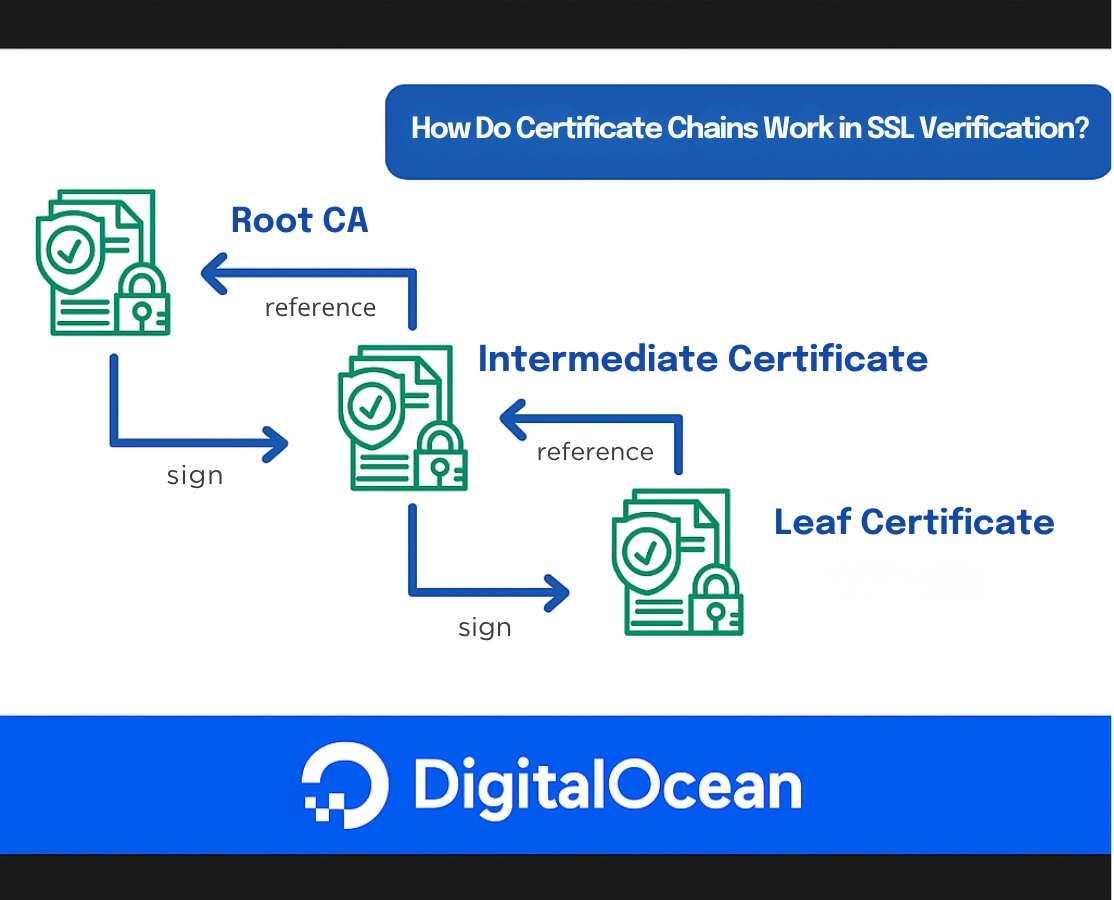
- Certificate Chain Validation: The TLS certificate is technically a digital signature which is issued by an intermediate CA for the server's domain name (www.example.com). The intermediate CA needs to sign the certificate using its private key, which is then verified by the client using the CA's public key. But if the intermediate CA's private key is compromised, then an untrusted 3rd party will be able to issue certificates to any malicious websites. To protect against this, an intermediate CA's certificate is issued by a Root CA. Root certificates are self-signed and are included in the trust stores of operating systems, browsers, and devices. Note there can be multiple intermediate CAs leading upto the root. The root CAs mostly stay offline to reduce the surface area of attacks to breach the private key, while the intermediate CA's take care of issuing certificates to end applications. In case any breach in intermediate CA, the root CA can immediately revoke the intermediate certificate, rendering every subordinate end-entity certificate invalid.
- Expiration Check: Every SSL certificate has a validity period, defined by its “Not Before” and “Not After” dates. The client checks that the current date falls within this range. If the certificate is expired or not yet valid, the client will refuse the connection.
The TLS connection is successfully established only if all the above steps are validated successfully. Otherwise the connection is refused. The above section only outlines the steps involved in TLS verification from a high-level. Refer to this blog post by DigitalOcean for a more detailed information on certificate verification.
Enabling TLS in a HTTP server
First of all we need to obtain a TLS certificate. For a production application the certificate is issued by some reputable, broswer-trusted Certificate Authorities (CAs) like Let's Encrypt, AWS, DigiCert, etc. But for our local testing we will use mkcert to generate a certificate. mkcert takes care of creating a 'Local Certificate Authority' on the machine & installs it into the system's truststore, which means the browser & tools like curl will recognize the certificate & won't give TLS validation errors.
First you need to install mkcert using your package manager:
brew install mkcert
Then setup the local CA:
mkcert -install
And, finally generate the certificates for localhost: mkcert localhost 127.0.0.1 ::1
This will generate two files i.e. localhost+2.pem (the certificate) & localhost+2-key.pem (the private key).
Then we need to write our server by loading the .pem files generated in the previous step. I've written the code for a simple HTTPs server in golang below (feel free to use any other language of your choice): package main
import (
"fmt"
"log"
"net/http"
)
func main() {
http.HandleFunc("/", func(w http.ResponseWriter, r *http.Request) {
w.Header().Set("Content-Type", "text/plain; charset=UTF-8")
w.WriteHeader(http.StatusOK)
fmt.Fprintf(w, "Hello, World!")
})
port := ":8080"
log.Printf("Starting HTTPS server on https://localhost:%s\n", port)
err := http.ListenAndServeTLS(port, "localhost+2.pem", "localhost+2-key.pem", nil)
if err != nil {
log.Fatalf("Failed to start HTTPS server: %v", err)
}
}
Run the program with the following command: go run main.go
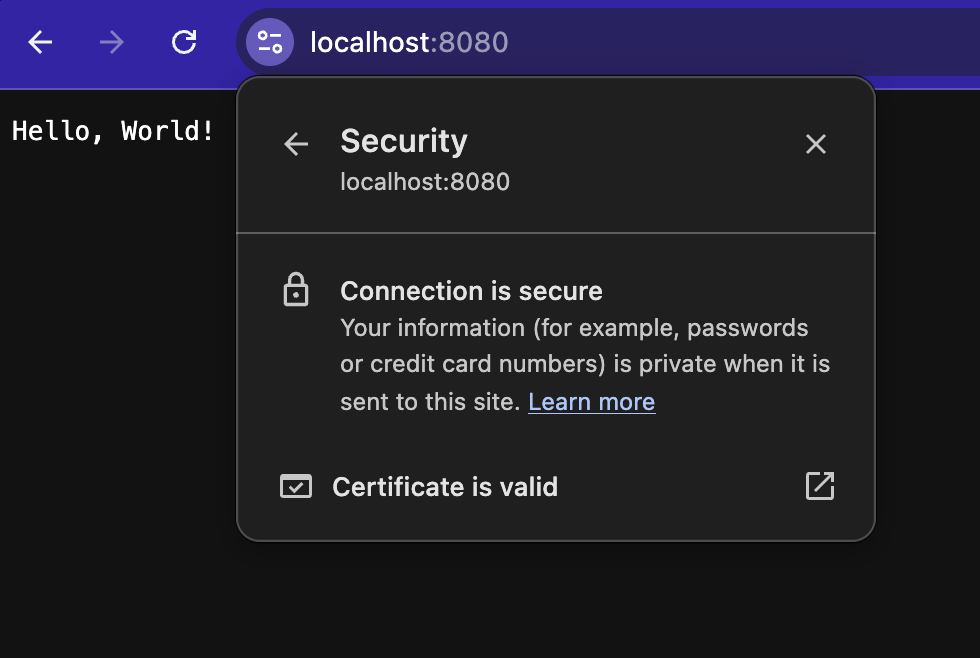
Now the server is ready to handle HTTPS traffic. If you navigate to https://localhost:8080 in your browser you should see the webpage as below. Notice the secure section:
% curl -vI https://localhost:8080
openssl s_client -connect localhost:8080 -msg
TLS configuration in multi-server setups
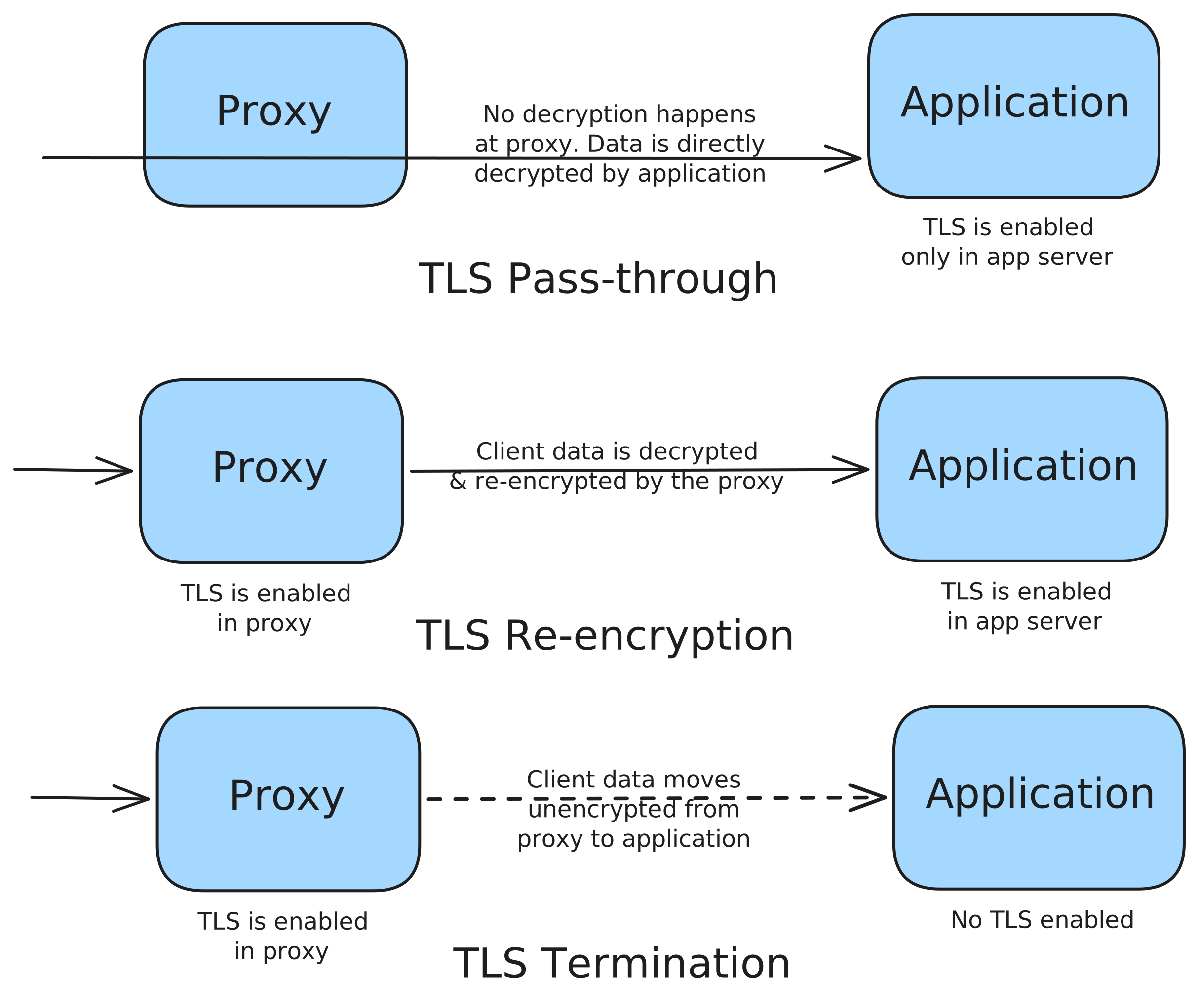
Now that we have explored how TLS can be setup in a single server, we are ready to explore the various ways TLS can be configured in a distributed cluster. In any kind of internet facing application, the application usually sits behind a reverse proxy like Nginx, through which it receives all the traffic. In such cases, we have the following options regarding how the TLS connection between the client & the proxy is forwarded to the application server. This process is known as TLS termination:
- TLS Passthrough: In this case, the proxy does not decrypt the TLS encrypted packets and directly forwards the raw TCP packets to the upstream application server. The upstream server is responsible for managing the TLS certificates and takes care of decrypting the data from the client. The proxy does not see the data at all. This offers the maximum data privacy but the proxy cannot be used to any perform operation (for eg. caching, logging, etc) on the data.
- TLS Re-encryption: In this case, the proxy receives the client data, decrypts it & forwards it to the application server using a different TLS connection which exists between the proxy and the application. TLS needs to be configured in both proxy & the application in this case. This is preferred in high security environments where some operation like traffic packet inspection or logging needs to be performed by the proxy.
- TLS Termination: In this case, the proxy terminates the TLS connection and sends the data unencrypted to the upstream application server. TLS is only configured at the proxy while the application server receives plain HTTP traffic. This is useful in private cloud environments like AWS VPC, etc where the traffic flows through an internal network once received by the gateway. By not having to maintain TLS certificates between all the servers, the overhead of maintaining multiple certificates is reduced & the computation overhead for encrypting packets at every hop is removed.
Client side TLS with mutual TLS (mTLS)
In mTLS, both the client & server have a TLS certificate which is verified by both the parties. The additional step here is that after the client verifies the server's certificate it presents its TLS certificate to the server. The server then verifies the client's certificate and grants access only if the certificate is valid.
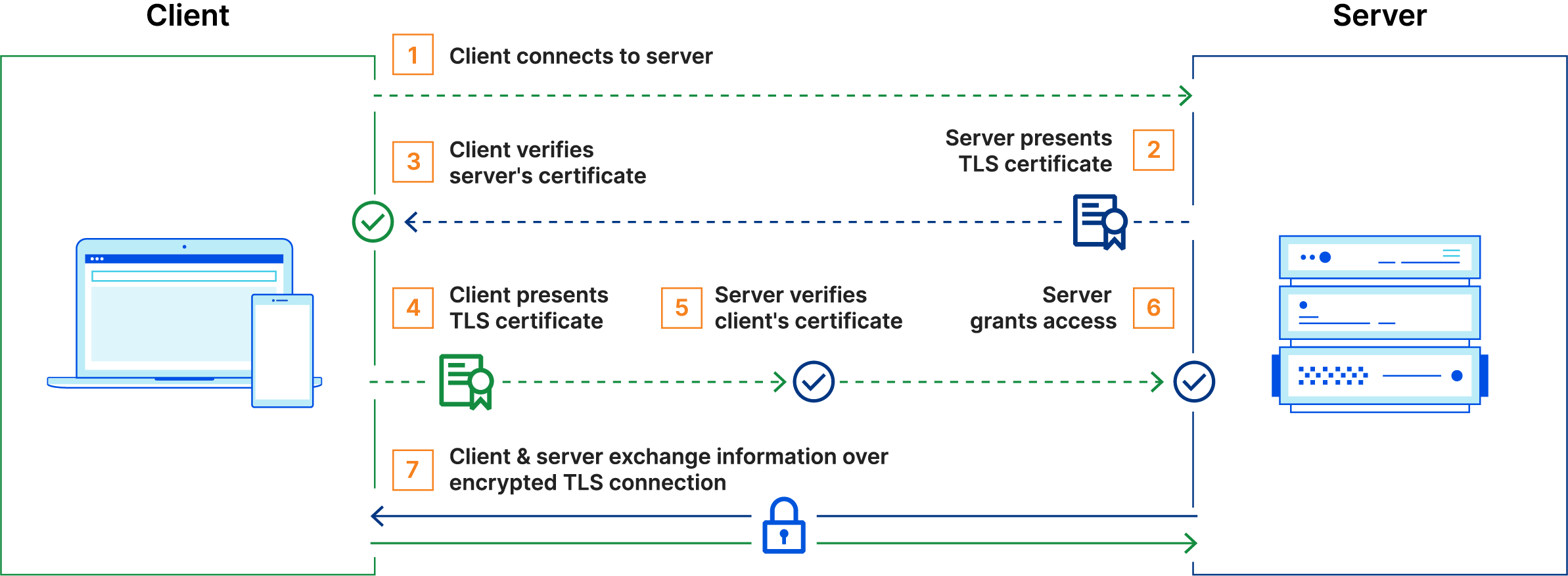
Unlike TLS, in the case of mTLS, the organization implementing it acts as its own CA. The root certificate in this case is also self-signed by the organization. This is because mTLS is usually implemented for service communication between enterprises and also to verify connections with client devices that don't follow a login process (e.g IoT devices). This provides an additional layer of security by ensuring that traffic is secure and trusted in both directions. For more detailed explanation of mTLS you may refer to this blog post by Cloudflare.
I won't be putting the code to implement mTLS in this post, to keep it short, but its very similar to normal TLS, with the exception that on the client side too a certificate needs to be configured & a quick LLM prompt should give the results.
Conclusion
TLS is one of the most widely used piece of modern technology and is often overlooked by a lot of application developers. The topics we covered in the above sections barely scratch the surface of TLS & related technologies and can easily expand into individual blog posts for each of them. It was a long post & thanks for bearing with me this long. I hope you learnt something new today!