An intro Apache Phoenix & HBase

Intro
Distributed data architectures often force developers into a tough architectural compromise. You can either choose a NoSQL engine for high-velocity, low-latency write scaling, or a traditional relational database for rich, complex SQL querying capabilities. This trade-off has driven big data design paradigms for years. The development of Apache Phoenix was born out of a similar necessity: providing an ANSI SQL abstraction layer over the mass-scale columnar storage layers of Apache HBase.
While both technologies can reside on the same compute cluster, their internal design mechanics serve opposing needs. Apache HBase is a rugged, low-level NoSQL storage platform modeled after Google's BigTable, persisting data as raw, uninterpreted byte arrays inside file blocks known as HFiles. Apache Phoenix, conversely, acts as an embedded relational query engine compiler that translates declarations (SELECT, WHERE, ORDER BY) into native parallel HBase scans, skipping network translation hops entirely.
In this blog post, I note down my architectural learnings on Phoenix internals while configuring and trying out these systems on my local machine. In the next few sections, I'll walk you through the setup steps for local testing and the internals of how Phoenix translates SQL queries into HBase compatible queries using a toy example of IoT fleet telemetry data. This post is mostly around the working of Phoenix and assumes that the reader is somewhat familiar with HBase.
A quick primer on how HBase & Phoenix store data on disk
The data model of HBase can be thought of as a multi-map or a key-value store with the data being ordered lexicographically by a single Row Key. Within a row key the data is referenced using column-family and column qualifiers. The column-family for a given table needs to be defined at table creation time whereas there can be an arbitrary number of column qualifiers within a column-family. The data points are then stored in cells which are denoted by a combination of row-key, column family and column qualifier. Given below is a conceptual representation of how data is stored in HBase. Note that, HBase only supports querying for data by the row key.
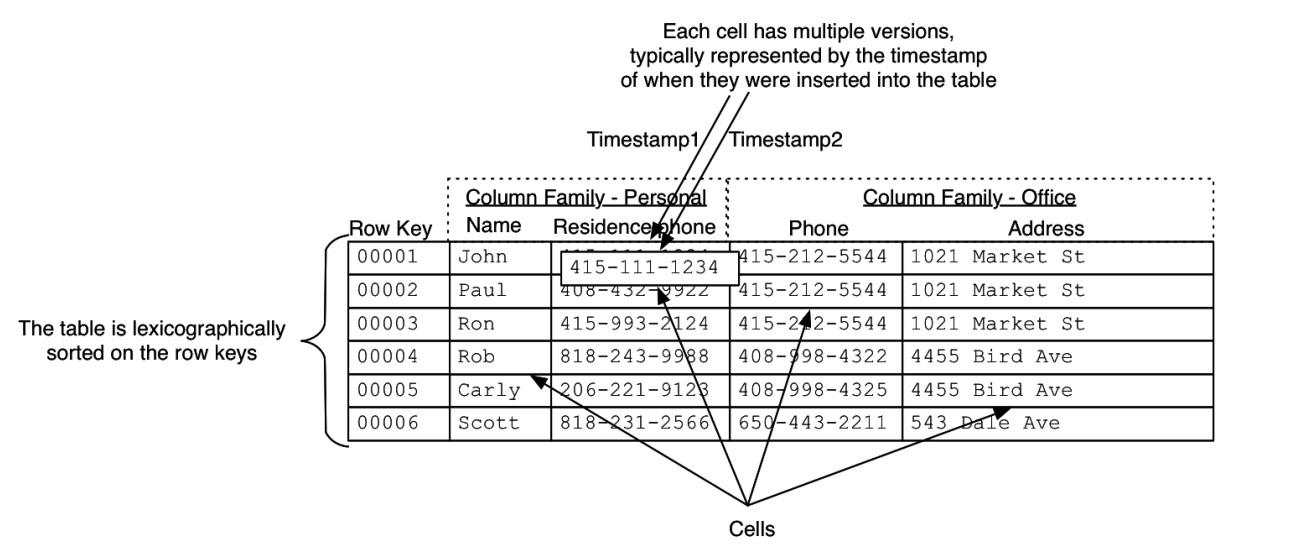
The major problem that the HBase data-model helps us to solve here is to efficiently lookup for data by row-keys when there are 100s of millions or even billions of row-keys. You can refer to the official HBase Docs for more info on this. Also refer to this blog post for a quick guide on HBase Architecture.
Apache Phoenix on the other hand is a query-engine that sits on top of Apache HBase and provides support for managing the data within HBase as SQL queries. It provides a JDBC connector which makes working with HBase as simple as writing plain SQL queries. However, its not a replacement for MySQL/PostgreSQL which are Online-Transaction Processing (OLTP) databases. Instead Phoenix makes interacting with HBase easier by providing SQL as an abstraction. Otherwise, performing operations on HBase will require writing complex Map-Reduce jobs and designing of secondary indexes.
Apache Phoenix in action
Let's try to locally run HBase and Phoenix. To run Phoenix you need to have an older Java version, e.g. Java 11. So setup Java first. Then you can follow the HBase docs to setup HBase first. And then setup Phoenix using its docs. You may take help from Gemini/ChatGPT to debug any issues that you may face.
Once you're able to open Phoenix sqlline, you can run the following SQL query to create a table:
  CREATE TABLE fleet_telemetry (
   vehicle_id VARCHAR NOT NULL,
   timestamp TIMESTAMP NOT NULL,
   speed DOUBLE,
   status VARCHAR
   CONSTRAINT pk PRIMARY KEY (vehicle_id, timestamp)
 );
Behind the scenes, Phoenix creates a unified HBase Row Key string by concatenating the primary key columns into a single stream of byts: [vehicle_id] + [timestamp]. This makes data access faster when querying metrics sequentially for a individual row by primary key, but because the layout forces a single sorting vector, it requires other optimizations to support filtering by non-primary keys, joins etc.
Programatic usage of Phoenix
Now let's try to write a Java ingestion program to write a few rows to the local Phoenix node & read back data from it. It will help us in building an understanding of the code-level abstraction that Phoenix provides us. To run all the examples given below I downgraded the Java version to JDK Version 11 temporarily, and also ensured that the phoenix-client JARs are available in the classpath.
The program below demonstrates real-time data streaming logic. A critical structural difference when interacting with Phoenix is how it orchestrates memory caching via batch buffering blocks.
Code (FleetManagement.java)
  package org.sundeep.phoenix;

 import java.sql.*;
 import java.util.Random;

 public class FleetManagement {

   private static final String JDBC_URL = "jdbc:phoenix:localhost:2181:/hbase";

   public static void main(String[] args) {
     System.out.println(" Starting IoT Fleet Ingestion & Read Test...");

     try {
       Class.forName("org.apache.phoenix.jdbc.PhoenixDriver");
     } catch (ClassNotFoundException e) {
       System.err.println(" Phoenix Driver not found in classpath! Add the client JAR.");
       e.printStackTrace();
     }

     try (Connection conn = DriverManager.getConnection(JDBC_URL)) {
       System.out.println(" Successfully connected to local Apache Phoenix over HBase!");
       writeRandomData(conn);
       readDataBack(conn);
       fetchSpeedingVehicles(conn);
     } catch (Exception e) {
       System.err.println(" Database operation failed:");
       e.printStackTrace();
     }
   }

   private static void writeRandomData(Connection conn) throws Exception {
     String upsertSql = "UPSERT INTO fleet_telemetry (vehicle_id, timestamp, speed, status) VALUES (?, ?, ?, ?)";
     Random rand = new Random();
     String[] statuses = {"NORMAL", "SPEEDING", "IDLE", "OVERHEATING"};

     System.out.println("\n Writing random entries to 'fleet_telemetry'...");

     try (PreparedStatement pstmt = conn.prepareStatement(upsertSql)) {
       for (int i = 1; i <= 3; i++) {
         String truckId = "TRUCK-0" + rand.nextInt(10);
         Timestamp now = new Timestamp(System.currentTimeMillis());
         double speed = 20.0 + (rand.nextDouble() * 70.0);
         String status = speed > 70 ? statuses[1] : statuses[rand.nextInt(statuses.length)];

         pstmt.setString(1, truckId);
         pstmt.setTimestamp(2, now);
         pstmt.setDouble(3, speed);
         pstmt.setString(4, status);
         pstmt.executeUpdate();

         System.out.printf("   [UPSERTED] %s | %s | Speed: %.2f km/h | Status: %s\n",
                         truckId, now, speed, status);
         Thread.sleep(100);
       }
       conn.commit();
       System.out.println(" Transaction committed successfully to HBase storage layers.");
     }
   }

   private static void readDataBack(Connection conn) throws Exception {
     String selectSQL = "SELECT vehicle_id, timestamp, speed, status FROM fleet_telemetry ORDER BY timestamp DESC LIMIT 10";
     System.out.println("\n Reading entries back from Apache Phoenix using SQL...");

     try (PreparedStatement pstmt = conn.prepareStatement(selectSQL)) {
       ResultSet rs = pstmt.executeQuery();
       System.out.println("-----------------------------------------------------------------------------------------");
       System.out.printf("%-12s | %-23s | %-12s | %-12s\n", "VEHICLE_ID", "TIMESTAMP", "SPEED (km/h)", "STATUS");
       System.out.println("-----------------------------------------------------------------------------------------");

       int count = 0;
       while (rs.next()) {
         String vehicleId = rs.getString("vehicle_id");
         Timestamp ts = rs.getTimestamp("timestamp");
         double speed = rs.getDouble("speed");
         String status = rs.getString("status");

         System.out.printf("%-12s | %-23s | %-12.2f | %-12s\n", vehicleId, ts, speed, status);
         count++;
       }
       System.out.println("-----------------------------------------------------------------------------------------");
       System.out.printf(" Total records retrieved in this query scan: %d\n", count);
     }
   }

   private static void fetchSpeedingVehicles(Connection conn) throws Exception {
     String selectSQL = "SELECT vehicle_id, timestamp, speed, status " +
                        "FROM fleet_telemetry " +
                        "WHERE speed > 70.0 " +
                        "ORDER BY timestamp DESC LIMIT 10";

     System.out.println("\n Fetching SPEEDING vehicles from Apache Phoenix (Speed > 70 km/h)...");
     try (PreparedStatement pstmt = conn.prepareStatement(selectSQL);
          ResultSet rs = pstmt.executeQuery()) {
       System.out.println("-----------------------------------------------------------------------------------------");
       System.out.printf("%-12s | %-23s | %-12s | %-12s\n", "VEHICLE_ID", "TIMESTAMP", "SPEED (km/h)", "STATUS");
       System.out.println("-----------------------------------------------------------------------------------------");

       int count = 0;
       while (rs.next()) {
         String vehicleId = rs.getString("vehicle_id");
         Timestamp ts = rs.getTimestamp("timestamp");
         double speed = rs.getDouble("speed");
         String status = rs.getString("status");

         System.out.printf("%-12s | %-23s | %-12.2f | %-12s\n", vehicleId, ts, speed, status);
         count++;
       }
       System.out.println("-----------------------------------------------------------------------------------------");
       System.out.printf(" Total speeding records retrieved: %d\n", count);
     }
   }
 }
In the code above, pstmt.executeUpdate() and conn.commit() handle distinctly decoupled tasks. When you fire executeUpdate(), no data passes across the network. Phoenix converts the SQL data into raw bytes and holds them inside an internal client-side RAM cache buffer. conn.commit() is the mandatory execution trigger that flushes this batched accumulation over the network, grouping payloads efficiently into unified HBase Write-Ahead Logs (WALs) and HFiles.
When you compile and run the code above it gives the following output (Ensure to pass the phoenix client in the program classpath):
  Successfully connected to local Apache Phoenix over HBase!

 Writing random entries to 'fleet_telemetry'...
   [UPSERTED] TRUCK-09 | 2026-07-25 17:03:38.255 | Speed: 75.27 km/h | Status: SPEEDING
   [UPSERTED] TRUCK-04 | 2026-07-25 17:03:38.383 | Speed: 71.69 km/h | Status: SPEEDING
   [UPSERTED] TRUCK-04 | 2026-07-25 17:03:38.489 | Speed: 43.08 km/h | Status: IDLE
 Transaction committed successfully to HBase storage layers.

 Reading entries back from Apache Phoenix using SQL...
 -----------------------------------------------------------------------------------------
 VEHICLE_ID   | TIMESTAMP               | SPEED (km/h) | STATUS
 -----------------------------------------------------------------------------------------
 TRUCK-04     | 2026-07-25 17:03:38.489 | 43.08        | IDLE
 TRUCK-04     | 2026-07-25 17:03:38.383 | 71.69        | SPEEDING
 TRUCK-09     | 2026-07-25 17:03:38.255 | 75.27        | SPEEDING
 TRUCK-08     | 2026-07-25 01:17:20.741 | 55.60        | NORMAL
 TRUCK-09     | 2026-07-25 01:17:20.639 | 73.83        | SPEEDING
 TRUCK-04     | 2026-07-25 01:17:20.532 | 52.63        | IDLE
 TRUCK-03     | 2026-07-25 01:16:54.784 | 77.30        | SPEEDING
 TRUCK-00     | 2026-07-25 01:16:54.68  | 83.94        | SPEEDING
 TRUCK-09     | 2026-07-25 01:16:54.573 | 49.06        | IDLE
 TRUCK-00     | 2026-07-25 01:13:15.483 | 87.74        | SPEEDING
 -----------------------------------------------------------------------------------------
 Total records retrieved in this query scan: 10

 Fetching SPEEDING vehicles from Apache Phoenix (Speed > 70 km/h)...
 -----------------------------------------------------------------------------------------
 VEHICLE_ID   | TIMESTAMP               | SPEED (km/h) | STATUS
 -----------------------------------------------------------------------------------------
 TRUCK-04     | 2026-07-25 17:03:38.383 | 71.69        | SPEEDING
 TRUCK-09     | 2026-07-25 17:03:38.255 | 75.27        | SPEEDING
 TRUCK-09     | 2026-07-25 01:17:20.639 | 73.83        | SPEEDING
 TRUCK-03     | 2026-07-25 01:16:54.784 | 77.30        | SPEEDING
 TRUCK-00     | 2026-07-25 01:16:54.68  | 83.94        | SPEEDING
 TRUCK-00     | 2026-07-25 01:13:15.483 | 87.74        | SPEEDING
 TRUCK-09     | 2026-07-25 01:13:15.378 | 77.98        | SPEEDING
 TRUCK-09     | 2026-07-25 01:13:15.273 | 71.22        | SPEEDING
 TRUCK-02     | 2026-07-25 00:05:01.501 | 82.30        | SPEEDING
 -----------------------------------------------------------------------------------------
 Total speeding records retrieved: 9
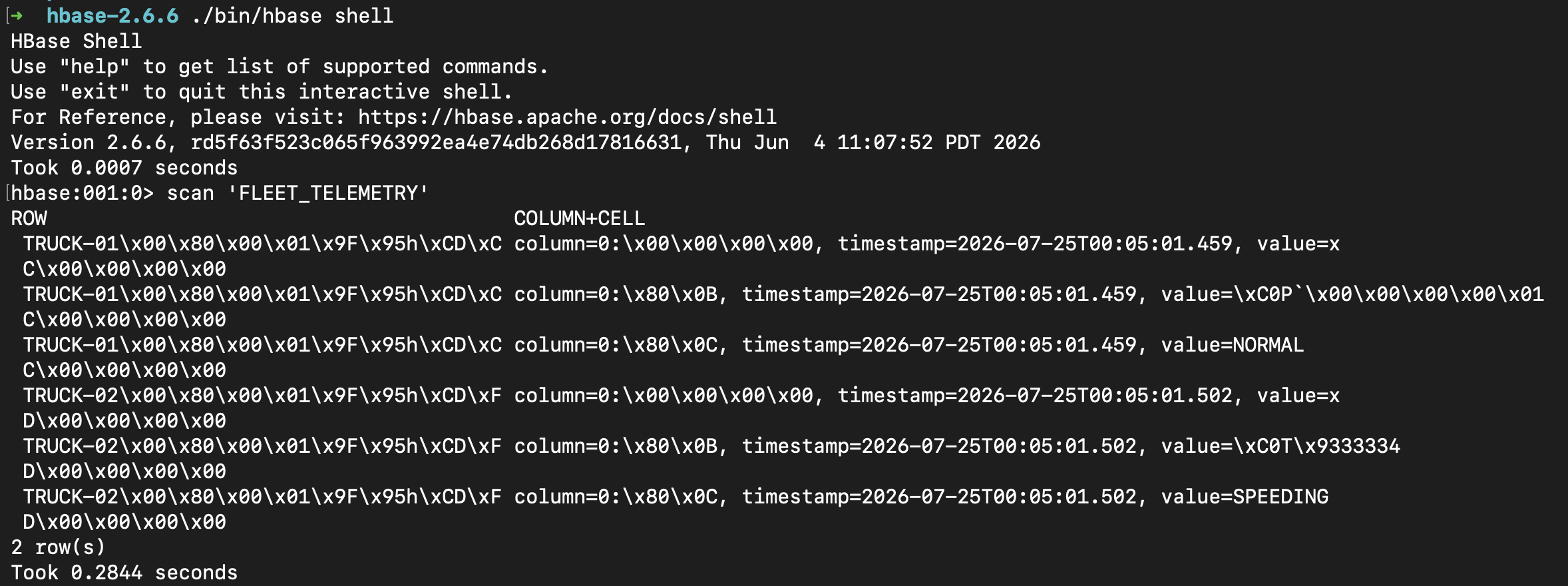
All the data that was written resides in the HBase table. If you open the hbase shell in a terminal window and query for FLEET_TELEMETRY table, you'll see the raw data residing there, as shown in the image below. I've also included a Java program that scans the HBase table for raw data.
Server-Side Optimization Mechanics Explored
To pull analytical data back efficiently—such as screening exclusively for speeding vehicles via a filtered query (SELECT * FROM fleet_telemetry WHERE speed > 70.0)—Phoenix deploys powerful underlying optimizations to prevent full database scanning constraints.
Essential Column Family Filters
Because the speed values inhabit the cell values rather than the row key string, standard NoSQL databases would stream entire row payloads across disk blocks into computer RAM just to check if the row matches. Phoenix skips this bottleneck by configuring an Essential Column Family Filter on the HBase Region Servers. The engine reads only the specific column files holding the speed attribute. If a row has a value below the threshold, it is dropped immediately on the server before being sent to the client, saving significant disk I/O and network bandwidth.
Distributed Merge Sorting
When executing sorted groupings across multiple entities (SELECT * FROM fleet_telemetry ORDER BY timestamp DESC LIMIT 10;), Phoenix avoids loading the complete table footprint into memory to execute a sort routine. Since our composite row key structure ensures data is pre-sorted on disk within individual vehicle scopes, Phoenix coordinates a parallel Merge Sort directly via server hooks. The remote storage servers pull only the top ten records from each distinct truck subset, streaming tiny pre-sorted responses back to the client application where they are merged seamlessly in milliseconds.
Secondary Indexes
If the analytical queries require constant, high-speed filtering by non-primary variables, full table scanning passes can be eliminated entirely by provisioning a Secondary Index:
CREATE INDEX idx_fleet_speed ON fleet_telemetry (speed) INCLUDE (status);
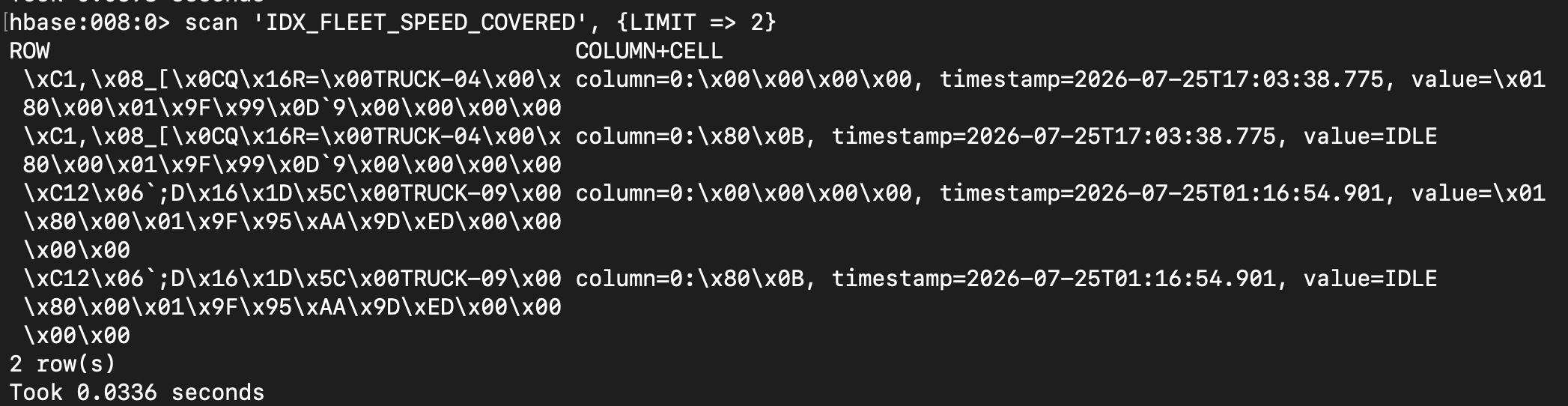
When this statement is executed, Phoenix builds an asynchronous, hidden shadow table where the HBase Row Key layout is structurally inverted: [speed] + [vehicle_id] + [timestamp]. The query optimizer dynamically detects this shadow table, intercepting incoming SQL requests and translating them from a sequential full table lookup into a precise, sub-millisecond HBase Range Scan on the shadow table. You should be able to see the new table (IDX_FLEET_SPEED_COVERED) created in your HBase shell as shown below:
Coprocessors: Bringing Code to the Data
The functional backbone executing these server-side data extractions is the HBase Coprocessor layer. Functioning as database-native triggers and distributed stored procedures, coprocessors allow custom runtime classes to execute concurrently right alongside physical disk files. By moving the evaluation logic directly onto the storage machines, mass aggregations execute at scale without flooding client network pipes, unlocking high-performance analytical warehousing capabilities on top of a low-latency NoSQL engine.
Auditing and Execution Diagnostics
The critical element to verify when designing high-velocity distributed data systems is auditing how the planning engine routes your execution paths. Prepending the EXPLAIN keyword to your SQL queries inside the Phoenix command-line tool provides a transparent breakdown of your indexing layout efficiency.
When running audit checks on non-indexed column predicates versus pre-sorted keys, you will observe the direct impact of the Essential Column Family Filter and client-side parallel scan merging workflows in the resulting execution diagnostic data logs.
As shown in the image below the output of EXPLAIN query shows that it uses an index scan when filtering for trucks based on speed as the index exists. Otherwise it would have led to a full-table scan:

Conclusion
Combining Apache HBase with Apache Phoenix allows teams to scale analytical pipelines horizontally without trading away the clarity of standardized relational code structures. By leveraging client-side batching protocols, distributed server side transformations, and optimized primary key compositions, you can transform low-latency key-value blocks into highly elastic enterprise database storage arrays.
All the code for the samples can be found in my Github repo.